 Memoro
One memory for every AI you use
Explain your project once. Memoro keeps a short, up-to-date card for each project, decision and preference — and every AI you connect reads and updates the same cards. Everything stays on your own computer.
- Claude Desktop (free)
- claude.ai
- ChatGPT
- Grok
- Perplexity
- Any MCP-compatible AI
The problem
Every AI chat starts from zero
You plan with Claude on Monday, continue in ChatGPT on Tuesday — and spend the first ten minutes re-explaining everything. Built-in AI memories don’t solve this: each one is locked inside a single app, and none of them talk to each other.
How it works
Set it up once, then just keep working
Install
Run the installer. Memoro starts with Windows and runs quietly in the background — no window to keep open.
Connect your AIs
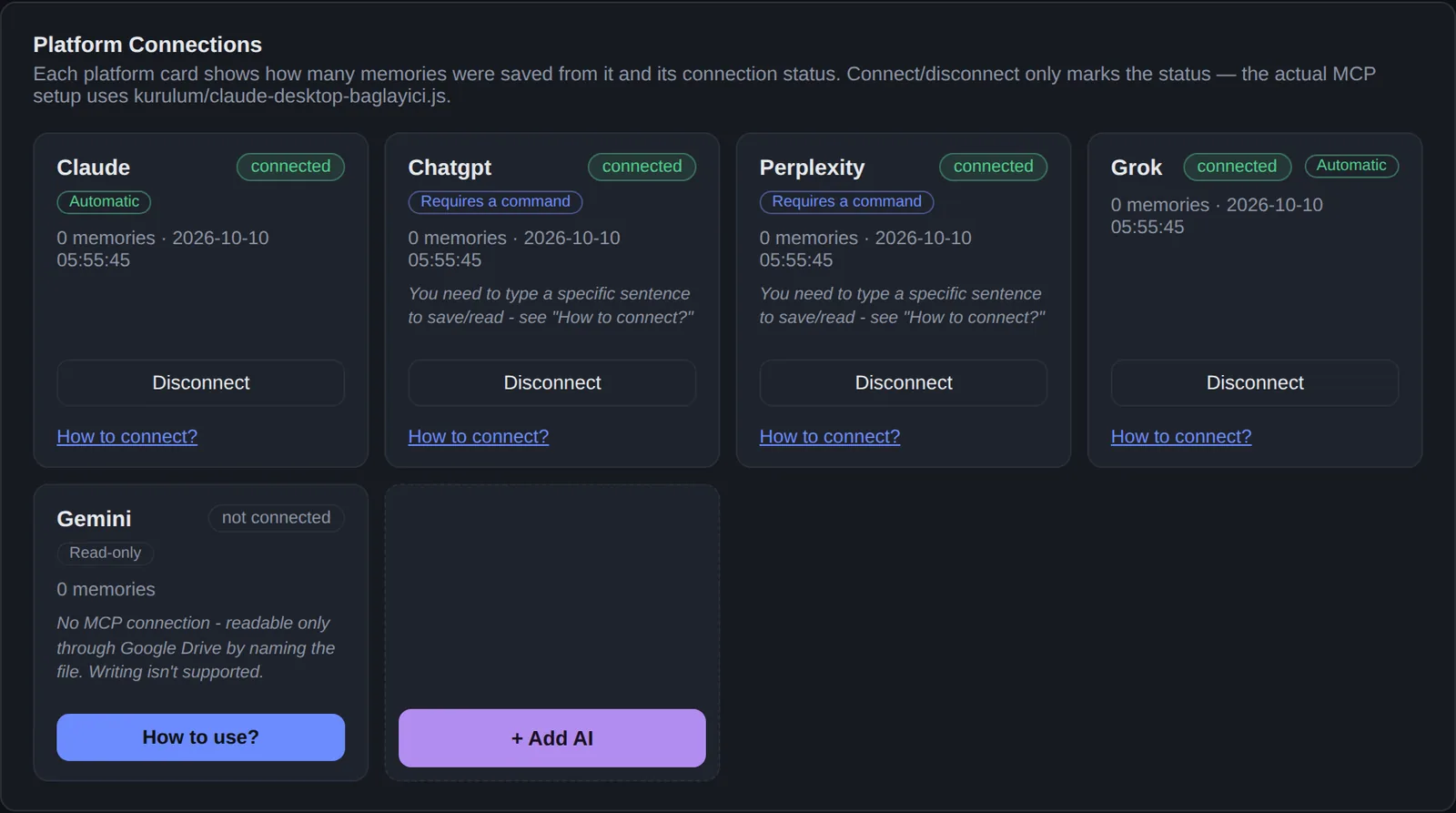
Claude Desktop is connected automatically. For claude.ai, ChatGPT, Grok and Perplexity you add Memoro once as a connector — the control panel shows exactly what to paste where.
Pick up anywhere
When a decision is made or a step is done, the AI writes it to that project’s card. Later, in any AI, ask “where were we?” and it continues from there.
Status cards
Cards, not chat logs
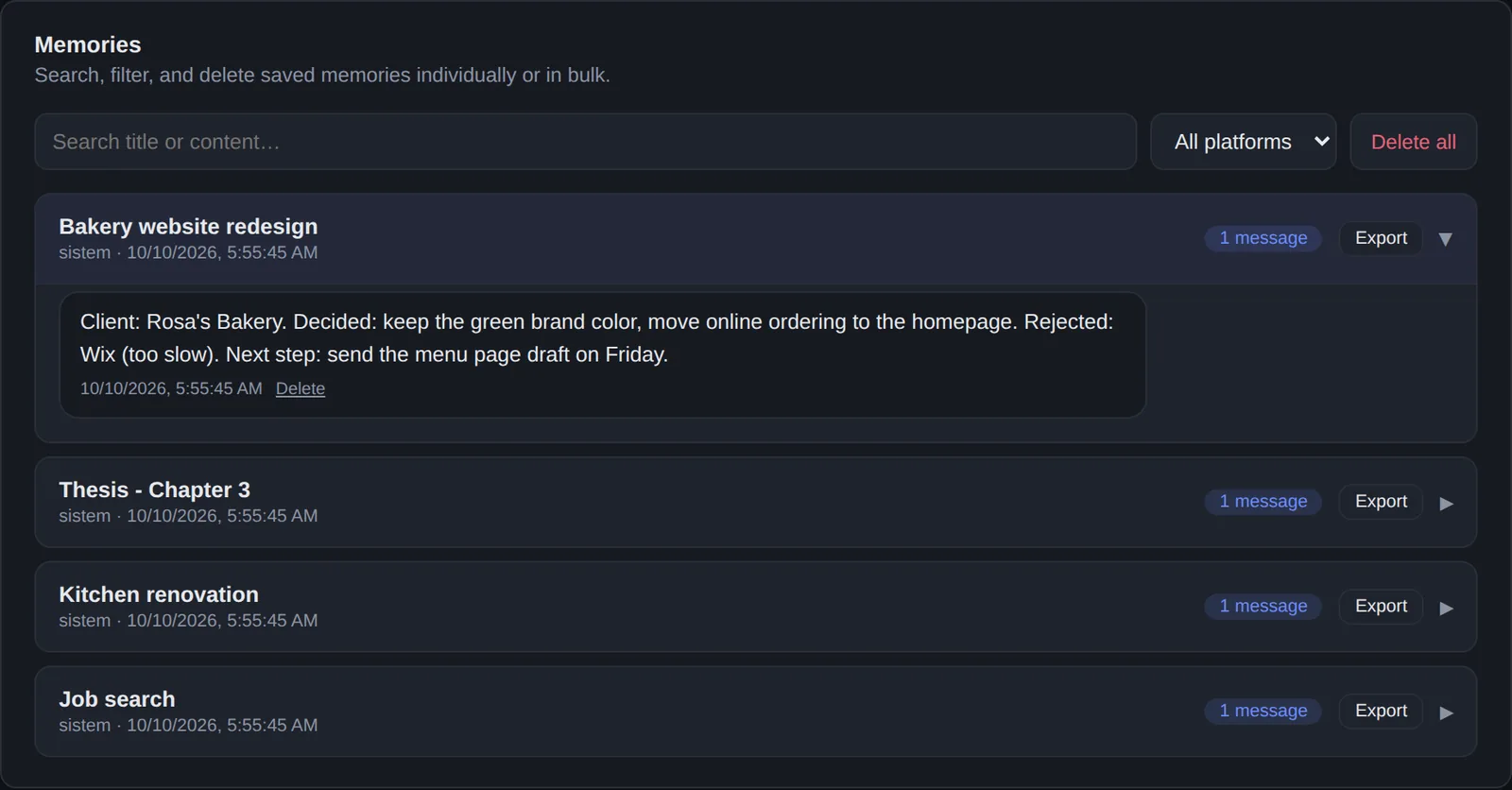
Memoro doesn’t record your conversations. The AI keeps one short status card per topic — and updates it instead of piling up contradictions.
- What was decided, what was ruled out, and what comes next — in a few lines.
- Always current: a changed decision updates the card instead of adding a conflicting note.
- Nothing is lost: older versions of every card are kept.
- Yours to manage: search, export or delete any memory from the control panel.
Features
Built to disappear into the background
Works across your AIs
Claude Desktop connects for free. With Pro, claude.ai, ChatGPT, Grok and Perplexity read and write the same memory, and “Add AI” connects any assistant that supports MCP.
Stored on your PC
Your memory is a database on your own computer. No account to create, and we don’t run a server that could see it.
Cloud bridge in your own account (Pro)
Using AIs in the browser or on your phone? One click deploys a small bridge to your own free Cloudflare account. Your computer stays the source of truth.
Self-healing
Starts with Windows, checks itself every 5 minutes and renews the cloud connection automatically if it drops.
You stay in control
One switch pauses recording. Search, export or delete anything. A backup is taken automatically every day.
English, Turkish, Russian
The app and installer follow your system language.
Supported AIs
Which AIs work with Memoro?
| AI | How it connects | Saving to memory |
|---|---|---|
| Claude Desktop | Local connection, set up by the installer — works without the cloud bridge | Automatic |
| claude.ai | Custom connector via your cloud bridge | Automatic |
| Grok | Connector via your cloud bridge | Automatic |
| ChatGPT | Custom connector via your cloud bridge* | Ask it to check or save |
| Perplexity | Connector via your cloud bridge | Ask it to check or save |
| Gemini | Reads the memory file through Google Drive | Read-only |
| Other MCP apps | “Add AI” in the control panel | Depends on the app |
Claude Desktop is free. Every other connection is part of Pro — included in the 7-day trial. * Some platforms only allow custom connectors on their own paid plans. “Ask it” means a short phrase such as “check my memory”; the control panel shows the exact wording.
We don’t run a server. That’s the point.
Your memory lives on your computer. If you turn on cloud access, it goes to your own Cloudflare account — not ours. We sell software, not data.
- No account needed
- No ads, no data sales
- The AI writes only what it’s meant to remember — no chat scraping
- Delete or export everything, anytime
Pricing
Free with Claude Desktop. Pro for everything else.
Free
- Claude Desktop connection (local, works offline)
- Unlimited memories and status cards
- Search, export and daily backups
- Updates included
Pro Pro
- Everything in Free
- claude.ai, ChatGPT, Grok and Perplexity
- Phone and browser access through your own cloud bridge
- “Add AI” for any MCP-compatible assistant
- Sync your memory across several PCs
- Team Projects (beta): shared cards, who-wrote-what history, approvals
FAQ
Questions
Is Memoro free?
Yes, with Claude Desktop — no time limit and no memory limit. Connecting claude.ai, ChatGPT, Grok, Perplexity or your phone, syncing several PCs and Team Projects need Pro. Every new install gets all Pro features free for 7 days, no card required.
How do I activate Pro?
Buy Pro, then paste the license key from your purchase email into the “License” section at the top of the Memoro control panel. Two days before your trial ends, the control panel and your connected AIs remind you.
Where is my data stored?
In a database on your own computer (in your Windows user folder). If you enable cloud access, a copy goes to your own Cloudflare account. We don’t operate any server.
Does Memoro read my chats?
No. It doesn’t scrape conversations. The AI uses Memoro’s tools to write a short card when something worth keeping happens — or when you ask it to.
Do I need a Cloudflare account?
Only for the Pro cloud bridge — when you want AIs in the browser or on your phone (claude.ai, ChatGPT, Grok, Perplexity) to reach your memory. A free Cloudflare account is enough, and the “Connect to cloud” button in the control panel does the setup. Claude Desktop works without it.
How is this different from ChatGPT’s or Claude’s own memory?
Built-in memories live inside one app and can’t be shared. Memoro is one memory for all of them, organized per project, stored on your computer and fully under your control.
What is MCP?
The Model Context Protocol — an open standard that lets AI assistants use external tools. Memoro is an MCP server, which is how different AIs can read and write the same memory.
Windows says “Windows protected your PC”. Is that normal?
Yes — the installer isn’t code-signed yet, so Windows shows this for new apps. Click “More info”, then “Run anyway”.
Does it need anything else?
Memoro runs on Node.js (free). If it’s missing, the installer tells you and opens the download page.
Mac or Linux?
Windows only for now. Mac and Linux are planned.
Stop re-explaining your projects
Install Memoro once, connect your AIs, and let every chat start where the last one ended.